For digital content creators, finding the perfect background score is often more challenging than filming the video itself. The constant fear of copyright strikes on platforms like YouTube, combined with the exorbitant costs of licensing popular tracks, creates a significant bottleneck in the production workflow. Even royalty-free libraries frequently offer repetitive, uninspiring loops that fail to match the specific emotional beat of a visual narrative. This friction has driven the rapid adoption of the AI Music Generator, a tool capable of synthesizing original compositions tailored to precise requirements. By shifting control from music supervisors to the creators themselves, this technology ensures that the audio component enhances rather than hinders the creative process.
The platform operates not by searching a database, but by generating new waveforms from scratch based on textual descriptions. This capability allows for a level of customization that stock libraries cannot match. Whether a project requires a “high-energy cyberpunk synth-wave track” or a “melancholic acoustic guitar ballad,” the system interprets these semantic cues to construct a unique piece of audio. In my analysis of the interface, the focus is clearly on reducing the time between ideation and execution, providing a practical solution for podcasters, social media managers, and indie game developers who need distinct audio identities without the legal headaches.
Exploring the Mechanism of Style Transfer and Composition
The underlying architecture of this system relies on sophisticated deep learning models trained on diverse musical datasets. Unlike early generative tools that sounded mechanical or disjointed, modern iterations have learned the nuanced relationships between different musical elements. When a user inputs a prompt, Text to Music AI does not just pick a genre; it understands how tempo, instrumentation, and harmonic progression interact to create a specific atmosphere. This results in a composition that feels structurally sound, moving logically from verses to choruses rather than meandering randomly.
Analyzing the Neural Network Behind Musical Genres
In my testing of the platform, the diversity of available styles was particularly improved in the later model versions. The system distinguishes between subtle sub-genres, capable of generating everything from “Slowed Reverb” tracks popular on TikTok to complex “Orchestral Sports Anthems.” The V3 and V4 models specifically demonstrate a stronger grasp of musical theory, ensuring that the generated backing tracks maintain key consistency and rhythmic integrity. This is critical for creators who need the music to sit comfortably behind voiceovers without distracting frequency clashes.
How the System Interprets Complex Mood Descriptors
A notable feature is the engine’s ability to process abstract emotional instructions. Instead of strictly technical terms like “120 BPM in C Major,” users can input descriptors such as “dreamy,” “anxious,” or “triumphant.” The AI translates these adjectives into musical parameters—increasing dissonance for anxiety or using bright, major chords for triumph. This semantic understanding bridges the gap for users who may lack formal music theory knowledge but know exactly how they want their audience to feel.
Step-by-Step Guide to Generating Custom Soundtracks
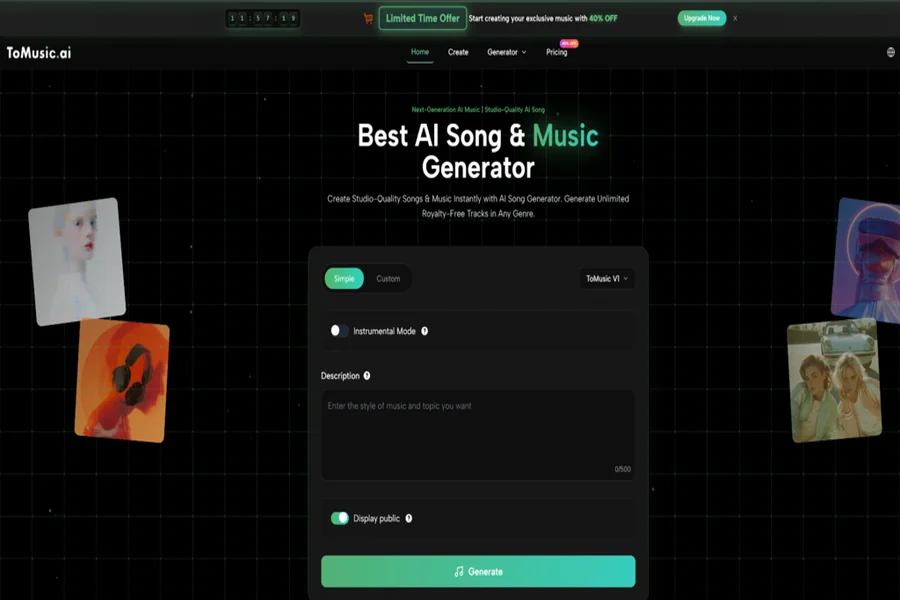
The workflow on the platform is designed to be linear and intuitive, minimizing the learning curve for new users. Based on the current interface, the process of creating a track from zero involves a few distinct stages that guide the AI toward the desired output.
Configuring the Initial Prompt and Lyrical Input
The first step requires the user to define the core essence of the song. You are presented with a text area where you can input custom lyrics if you want a vocal track, or simply describe the instrumental vibe. For optimal results, combining genre tags (e.g., “Pop,” “Rock”) with mood tags (e.g., “Happy,” “Sad”) helps narrow down the infinite possibilities. The interface allows for specific structural instructions, enabling users to dictate the flow of the song from the outset.
Selecting Advanced Model Parameters for High Fidelity
Once the creative direction is set, the second step involves technical selection. Users choose between different model generations, such as the efficient V1 or the high-fidelity V4. This stage also allows for the toggle of “Instrumental Mode” if vocals are not required. Crucially, this is where the “Custom Mode” can be engaged, offering granular control over the song’s duration and style strength, ensuring the AI adheres strictly to the prompt rather than improvising too loosely.
Finalizing and Exporting the Audio Composition
The final action triggers the generation process. In my experience, the system typically produces two variations for every prompt, giving the user a choice between different melodic interpretations. After reviewing the generated audio, the user can download the file. The platform supports standard MP3 downloads for quick sharing, while higher-tier access unlocks uncompressed WAV files, which are essential for professional video editing and mixing workflows.
Assessing the Versatility of Specialized Music Modes
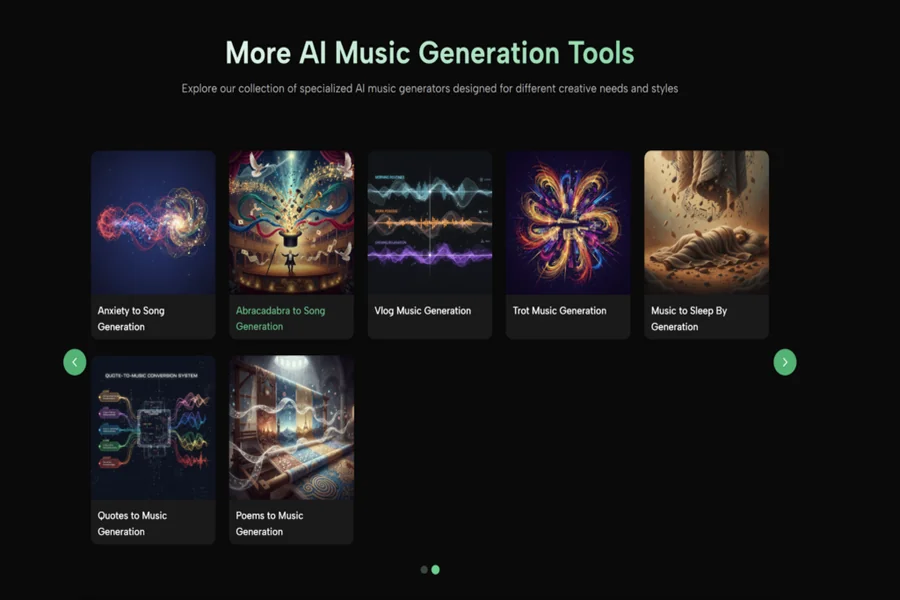
Beyond standard song generation, the platform includes specialized modes tailored for specific internet trends and content types. These modes, such as “Story Song Generation” or “Brainrot Song Generation,” show an awareness of current social media landscapes where audio memes drive engagement. This flexibility transforms the tool from a simple music maker into a content strategy asset.
Comparing Instrumental Tracks Versus Vocal Heavy Arrangements
The distinction between instrumental and vocal tracks is significant. In instrumental mode, the AI focuses entirely on texture and melody, often resulting in cleaner, more background-friendly audio. When vocals are introduced, the complexity increases. The latest models attempt to match the lyrical prosody—the rhythm of the speech—to the musical beat. While generally impressive, it is worth noting that vocal generation can sometimes produce artifacts or mispronunciations, particularly with complex or rapid-fire lyrics, requiring a few regenerations to get perfect.
The Impact of Lyrics on Song Structure
When custom lyrics are provided, they act as a scaffold for the musical arrangement. The AI analyzes the verse-chorus structure implied by the text formatting and builds the song’s energy curve to match. For example, a repeated chorus section in the text will often trigger the AI to increase the dynamic intensity and instrumentation density, mimicking the dynamics of a human-composed song.
Evaluating Subscription Value for Digital Professionals
For casual users, the free tier offers a glimpse into the technology’s potential, but professional application requires a closer look at the paid features. The limitations on duration and audio quality in the lower tiers can be restrictive for serious production work. The “Unlimited” plan, which unlocks the V4 model and provides a commercial license, is positioned as the standard for anyone intending to monetize their content on platforms like Spotify or YouTube.
Understanding Copyright and Commercial Usage Rights
The most critical aspect for creators is the legal standing of the generated media. The platform explicitly states that paid subscriptions grant commercial ownership of the tracks. This is a major differentiator from free tools where the platform often retains the rights. Owning the copyright means creators can freely use the music in sponsored content, ads, and films without paying royalties.
| Feature Comparison | Standard / Free Tier | Professional / Unlimited Tier |
| Generation Model | Basic V1 Model Only | Advanced V1, V2, V3, V4 Models |
| Audio Quality | Standard MP3 Compression | High-Res WAV & MP3 |
| Track Duration | Limited (approx. 4 mins) | Extended (up to 8 mins) |
| Rights & Usage | Non-Commercial Only | Full Commercial Ownership |
| Processing Speed | Standard Queue Priority | Priority Fast Processing |
| Storage Limit | Standard Cloud Storage | Unlimited Storage Space |
| Advanced Tools | Not Available | Stem Separation & Extensions |