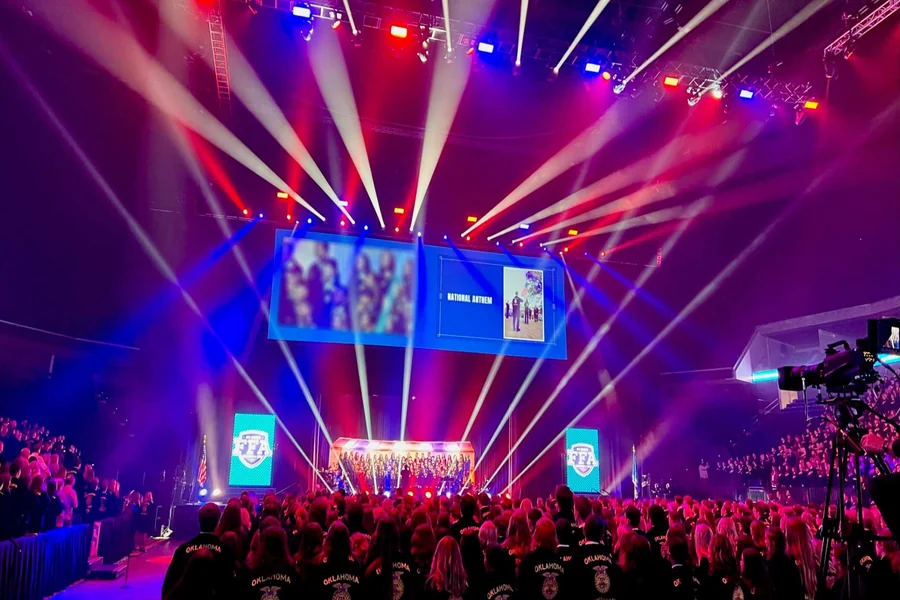
Technology plays a major role in nearly every corporate event. A keynote presentation depends on clear microphones. A product launch relies on bright displays. A training session needs reliable sound and visuals so every attendee can follow along. Businesses that understand what is av quickly realize that audiovisual technology is much more than speakers and projectors. Professional AV systems help presenters communicate clearly, keep audiences engaged, and ensure events run smoothly from beginning to end.
What Does AV Mean?
AV stands for audiovisual.
The term combines two essential components:
- Audio
- Visual
Audio includes everything attendees hear.
Visual includes everything attendees see.
These systems work together to create an effective event experience.
Without either one, communication becomes much more difficult.
Why AV Matters at Corporate Events
Business events depend on communication.
Employees need to understand training materials.
Clients need to see demonstrations.
Investors need to follow presentations.
Conference attendees need to hear every speaker.
Professional AV makes all of this possible.
Good technology removes distractions and keeps the audience focused on the message.
Audio Is the Foundation of Every Presentation
People often notice poor sound before anything else.
A microphone that cuts out.
A speaker that crackles.
An echo that makes voices difficult to understand.
Even a great presentation loses its impact if attendees cannot hear clearly.
Professional audio systems help eliminate common issues like:
- Feedback
- Echo
- Distortion
- Uneven volume
- Dead zones
Every attendee should hear the presentation with equal clarity.
Microphones Are More Than Simple Accessories
Different events require different microphone types.
Common options include:
Lavalier Microphones
Small microphones clipped to clothing.
Ideal for keynote speakers.
They allow presenters to move freely.
Handheld Microphones
Often used during:
- Q&A sessions
- Panel discussions
- Audience participation
They provide flexibility for multiple speakers.
Headset Microphones
Popular for presenters who move frequently.
Fitness demonstrations.
Interactive workshops.
Training sessions.
They remain securely positioned throughout the presentation.
Speakers Must Match the Venue
One speaker rarely covers an entire ballroom.
Professional AV teams calculate speaker placement carefully.
Factors include:
- Room size
- Ceiling height
- Seating layout
- Wall materials
- Audience size
Proper placement ensures balanced sound throughout the room.
Visual Technology Has Become More Important Than Ever
Business presentations rely heavily on visual communication.
Companies regularly display:
- Sales reports
- Product images
- Marketing videos
- Financial charts
- Company updates
High-quality visuals help audiences understand information faster.
Projectors Continue to Serve Many Events
Projectors remain useful for:
- Training sessions
- Conference rooms
- Educational seminars
Modern projectors deliver bright images with high resolution.
Proper screen placement also improves visibility.
LED Displays Offer Greater Flexibility
LED walls continue to grow in popularity.
They provide:
- Bright images
- Sharp colors
- Excellent visibility
- Flexible sizing
Unlike projectors, LED displays perform well even in brightly lit rooms.
That makes them ideal for many conference environments.
Lighting Supports Every Presentation
Lighting affects both visibility and atmosphere.
Professional lighting helps:
- Highlight presenters
- Improve audience focus
- Enhance video recording
- Strengthen branding
Poor lighting creates distractions.
Proper lighting improves professionalism.
Presentation Switching Keeps Events Moving
Many conferences feature multiple speakers.
Each presenter may use:
- PowerPoint
- PDFs
- Videos
- Live demonstrations
Presentation switching allows technicians to move smoothly between content.
The audience experiences seamless transitions.
Confidence Monitors Help Presenters
Confidence monitors face the stage.
They display:
- Presentation slides
- Speaker notes
- Timers
Presenters stay oriented without turning toward the main screen.
This creates a more natural delivery.
Video Recording Extends Event Value
Many corporate presentations remain valuable after the event.
Professional recording allows companies to create:
- Employee training libraries
- Internal communications
- Marketing content
- Customer education
One presentation can continue providing value long after attendees leave.
Live Streaming Expands Attendance
Remote participation has become increasingly common.
Live streaming allows organizations to reach:
- Remote employees
- International clients
- Business partners
- Virtual attendees
Professional streaming provides:
- Better video quality
- Clearer audio
- More reliable broadcasts
Hybrid Events Depend on Strong AV
Hybrid events combine in-person and online audiences.
This creates additional technical requirements.
Successful hybrid events require:
- Multiple cameras
- Audio mixing
- Streaming platforms
- Reliable internet
- Remote audience support
Every attendee deserves a quality experience.
Internet Connectivity Supports Modern Events
Many presentations depend on online resources.
Examples include:
- Software demonstrations
- Cloud presentations
- Virtual speakers
- Audience polling
- Live dashboards
Reliable internet has become essential for business events.
Backup connections add additional security.
Technical Support Solves Problems Quickly
Technology occasionally experiences problems.
Professional technicians monitor equipment throughout the event.
They manage:
- Audio adjustments
- Lighting cues
- Video playback
- Presentation changes
- Equipment troubleshooting
Quick action prevents small issues from disrupting the schedule.
Backup Equipment Reduces Risk
Experienced AV providers prepare for equipment failure.
Common backup items include:
- Spare microphones
- Extra laptops
- Replacement adapters
- Backup cables
- Additional batteries
Preparation keeps events running smoothly.
AV Planning Begins Long Before Event Day
Successful events require careful preparation.
Planning often includes:
- Venue walkthroughs
- Equipment selection
- Internet testing
- Stage design
- Speaker coordination
Early planning reduces surprises.
Venue Size Changes Equipment Requirements
Small meeting rooms require simple systems.
Large convention halls require significantly more equipment.
Planning depends on:
- Audience size
- Room dimensions
- Viewing distance
- Acoustic conditions
Every venue presents unique challenges.
Rehearsals Improve Event Quality
Practice sessions allow everyone to prepare.
Technicians verify equipment.
Presenters become comfortable.
Schedules are confirmed.
Small adjustments prevent larger problems.
Audience Engagement Improves With Better Technology
People remain focused when presentations are easy to follow.
Professional AV helps attendees:
- Hear clearly
- See presentations
- Follow demonstrations
- Participate confidently
Technology supports communication rather than distracting from it.
Stage Design Supports Visibility
Every attendee should have a clear view.
Professional stage layouts consider:
- Screen placement
- Speaker locations
- Camera angles
- Lighting positions
Proper design improves the experience from every seat.
Cable Management Improves Safety
Large events require many cables.
Professional installation keeps them organized.
Benefits include:
- Safer walkways
- Cleaner appearance
- Faster troubleshooting
- Better equipment protection
Small details contribute to a more professional environment.
AV Supports Company Branding
Technology helps reinforce brand identity.
Organizations often display:
- Company logos
- Brand colors
- Welcome videos
- Digital signage
- Stage graphics
Consistent branding strengthens credibility.
Measuring Event Success
Professional AV contributes to measurable outcomes.
Organizations often see improvements in:
- Audience engagement
- Speaker confidence
- Presentation quality
- Information retention
- Overall attendee satisfaction
Technology directly supports communication goals.
Common AV Mistakes to Avoid
Some organizations underestimate their AV requirements.
Common mistakes include:
- Using insufficient speakers
- Poor microphone selection
- Inadequate lighting
- Skipping rehearsals
- Ignoring internet reliability
Proper planning prevents these issues.
Choosing the Right AV Partner
Experience matters.
Look for providers that offer:
- Equipment planning
- Installation
- On-site technicians
- Live streaming
- Recording services
- Technical support
A knowledgeable team helps reduce stress throughout the event.
Final Thoughts
Audiovisual technology is one of the most important elements of a successful corporate event. Clear sound, sharp visuals, reliable equipment, and experienced technical support all contribute to effective communication. Whether the event is a small executive meeting or a large industry conference, professional AV helps presenters deliver their message with confidence while keeping audiences engaged.
Understanding what is av makes it easier to appreciate how much planning and technology go into a seamless event experience. From microphones and displays to lighting, live streaming, and technical coordination, every component plays an important role in creating events that are professional, memorable, and successful.