When you’re using an anime AI generator for free, it comes to a point where you start wondering whether paying would actually make a difference. Maybe you’re generating more often, trying to keep the same character across several images, or running into limits when you want to experiment.
The answer depends on what you’re using the generator for. A paid plan can give you more room to generate and access to additional tools, but that doesn’t mean every creator needs one.
In this guide, we’ll compare free and paid anime AI workflows and look at where upgrading starts to make a practical difference. We’ll use PixAI as a hands-on example and focus on the things that actually affect the way you create.
What can you do with a free anime AI generator?
Depending on the platform, a free anime AI generator can let you explore different models, use community LoRAs, generate multiple variations, and develop a character across several images.
What you need to consider is how far those options take you before limits start affecting your workflow. A free tier can be enough for occasional creation and experimentation, while a creator generating dozens of images for one project may reach those limits much sooner. The difference becomes clearer when you compare the actual workflow rather than looking at the word “free” on a pricing page
What does paying for an anime AI generator get you?
Paying for an anime AI generator usually matters most when you start asking more from the workflow. You may need more generations to explore an idea, more room to iterate, or access to particular models or advanced controls.
The value depends on which of those things you actually need. If the free workflow already covers your usual projects, upgrading may not change much. If you’re regularly running into limits, paying can give you more room to keep creating without constantly working around them.
Free vs. paid: What you should compare
The biggest difference between free and paid access often comes down to how much freedom you have to use the AI anime generator. Instead of looking only at the price, compare the parts of the workflow that affect what you can actually create.
Image quality
Check whether the same models and generation settings are available on both tiers. Paying doesn’t automatically mean your images will look better if you’re using the same model and setup, but it may unlock better image resolutions.
Generation capacity
Think about how often you generate. A few images a week is very different from running dozens of generations while developing one character or testing different prompts.
Note that the limit here mostly depends on the amount of image generation credits you have. Free tiers are very limited, but members get a higher limit.
Model access
Different models can produce noticeably different results, so check whether the models you want to use are available on the free tier. Having more choices can matter when you’re working toward a particular anime style or character design.
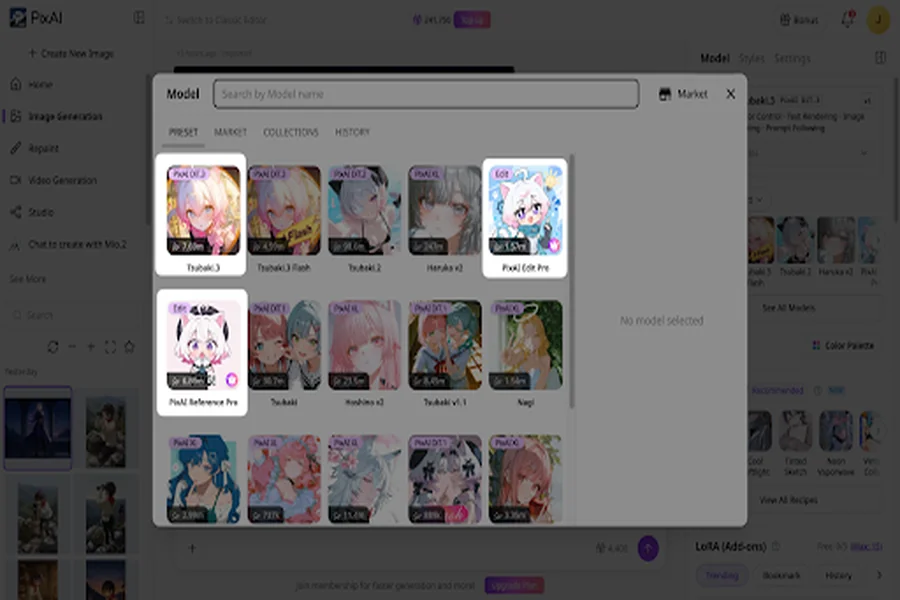
Note that most models are available in the free tier, but specialized ones may not be. For example, PixAI’s flagship models like Tsubaki.3 are free. However, PixAI Reference Pro and PixAI Edit Pro are only available to premium members.
Advanced controls
Look at the controls you actually expect to use, such as references, LoRAs, or editing tools. A paid feature only adds value if it gives you something you need in your workflow, but you need these if you want to create a project.
LoRA training
Using an existing community LoRA and training your own are two different things. Community LoRAs can give you more control over a generation, while custom LoRA training is useful when you need to build a reusable character or style of your own. If training is part of your workflow, check whether the free tier supports it and what resources it requires.
Hands-on: Free vs. paid anime AI workflow
Now, let’s see where the difference between free and paid access actually shows up in practice. We’ll use a typical anime creat no ion workflow and look at what changes as we move from a first generation to repeated iterations and more advanced controls.
Test 1: Start with the same anime generation
Let’s begin with the same prompt and, where possible, the same model under both free and paid access. Look at the finished images side by side and see whether paying makes a noticeable difference to the actual result.
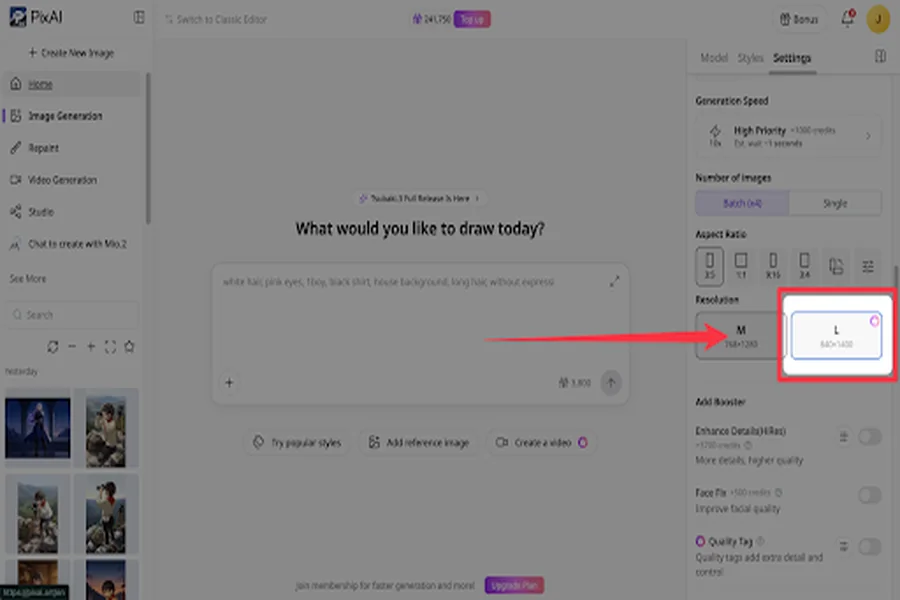
In most cases, the result should stay the same when using the same model. The image quality and size are what can change, as some resolutions and dimensions are restricted to premium users. However, this also depends on the model. For example, PixAI’s Tsubaki.3 has no size limits on the free tier, but Haruka v2 does.
Test 2: Push the workflow through multiple generations
Now let’s keep developing the same idea instead of stopping after one image. Generate several variations with different poses, compositions, or expressions and see when the free workflow starts to feel restrictive.
This part of the workflow isn’t really restrictive even on the free tier, but multiple generations mean you need to pay for credits or a membership plan.
Test 3: Use advanced controls
Next, try a control such as a LoRA, reference, or editing feature. See whether the free workflow gives you enough control for what you’re trying to create, and whether paid access opens up something that would genuinely improve the process.
Here, you’ll notice a few limitations on the free plan. Some image sizes may be limited, and you may also not be able to add quality tags to get extra detail and control.
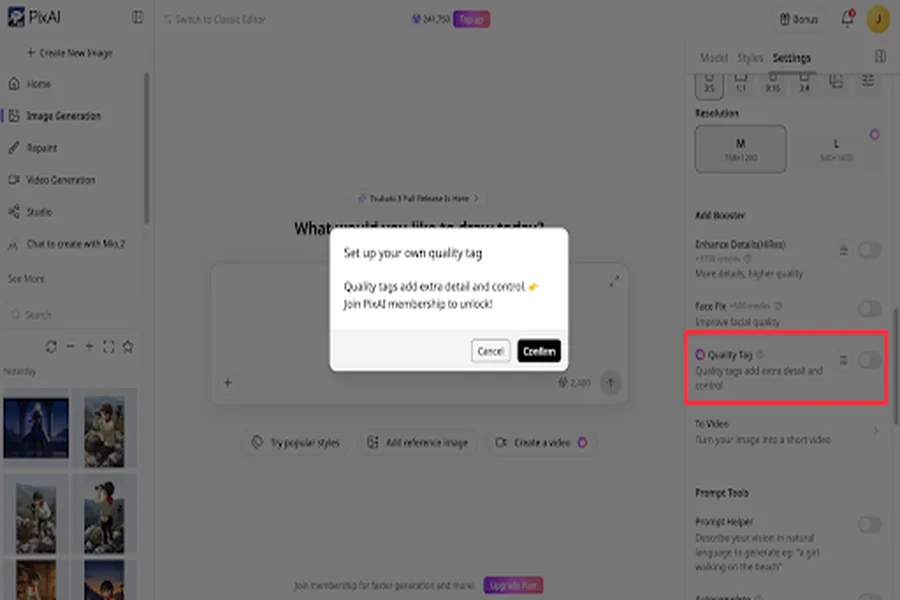
PixAI lets you use community LoRAs to bring a particular style or character to your creation, but training your own LoRA is only available for premium members. You also won’t have access to PixAI’s Reference Pro model for extra control, but you can still use Smart Reference on the free plan.
Test 4: Build a recurring character
Finally, take the same character through several images. Change the setting, pose, or expression while keeping the character recognizable. This shows whether paying becomes more useful when you’re developing a character rather than generating one-off images.
To maintain maximum consistency, you’ll likely need to upgrade to a premium membership. It will give you access to character consistency tools such as image reference and custom LoRAs, as discussed.
When free is enough
Free access can be enough when your anime projects don’t require a high volume of generations or advanced paid features.
Occasional creators
If you only generate anime images now and then, free access may give you plenty of room to create what you need. You can experiment with prompts, try different ideas, and come back when you have another project without paying for capacity you rarely use.
Beginners learning the workflow
If you’re still learning how prompting, models, LoRAs, and other controls affect your images, it’s good to spend some time with the free workflow first. You can figure out what you actually need before deciding whether a paid plan is worthwhile.
Creators with low-volume projects
A project that only needs a small number of finished images may not justify paying for additional generation capacity. If you’re able to complete the project without regularly hitting limits, free access can remain a practical option.
When upgrading starts to make sense
Paying starts to make more sense when free access is becoming a constraint on something you’re already trying to do. Try to see whether the extra capacity or features solve a problem in your workflow.
You’re generating frequently
If you’re generating images every day or running many variations to find the right result, free limits can start to slow you down. More generation capacity becomes useful when you regularly need several attempts to develop an idea.
You’re developing original characters
An original character can take many generations to develop. You may want different poses, outfits, expressions, scenes, and compositions. If you’re doing this regularly, having more room for iterations can make paid access worthwhile.
You need custom LoRAs
Community LoRAs can take you a long way, but custom LoRA training is a different workflow. If you need to train your own character or style LoRA for repeated use, paid access may become more relevant depending on the platform’s current requirements.
You’re producing content regularly
If anime generation is part of your regular content workflow, you may value the ability to generate whenever you need to rather than planning each session around free limits. The more consistently you create, the more useful additional capacity can become.
Free limitations are interrupting your workflow
This is probably the clearest signal that it’s time to consider upgrading. If you keep running into a generation limit, feature restriction, or lack of access to something you genuinely need, compare the cost of upgrading with how much that limitation is affecting your work.
Free vs. paid by creator type
The right choice depends on how you use an anime AI generator. A casual creator and someone producing images every day can have completely different needs, even if they’re using the same tools.
| Creator type | Free access | Paid access |
| Occasional creator | Usually enough for occasional images and experimentation | Useful if generation becomes more frequent |
| Beginner | Good for learning prompts, models, and basic controls | Worth considering once free limits start getting in the way |
| OC creator | Works for smaller character projects | More useful for repeated character development and larger projects |
| Content creator | Fine for occasional posts | More practical for regular content production |
| LoRA-focused creator | Community LoRAs may be enough | More relevant if you need custom LoRA training |
| High-volume creator | Limits may become restrictive | Better suited to frequent generation and repeated iterations |
| Video creator | Generally restricted | Premium becomes relevant when you need video generation |
Where PixAI fits
PixAI’s connected workflow makes sense across different levels of anime creation, but the point at which you benefit from paying depends on how much you use the platform and which parts of the workflow matter to you.
For beginners
If you’re still learning how anime AI generation works, starting with the free workflow gives you enough room to experiment with prompts, models, and community LoRAs before committing to a paid plan. You can get a feel for what you actually need before spending money.
For creators who are growing
As you start generating more often, developing characters, or working on larger projects, additional generation capacity becomes more useful. This is where a paid PixAI plan can make sense if free limits are regularly slowing down your workflow.
For creators with specific production needs
Paid access becomes even more relevant when you need capabilities such as higher-volume generation, advanced editing tools, or custom LoRA training. These are more specialized requirements, so whether upgrading is worthwhile depends on the type of work you’re producing and how often you need those features.
When is upgrading actually worth it?
Upgrading is worth considering when the free workflow starts limiting something you regularly need. If you only create a few images now and then, free access may be all you need. But if you’re generating frequently, developing characters, producing content regularly, or relying on advanced features such as custom LoRAs and video generation, paid access can give you the extra capacity and control to keep working without those restrictions getting in the way.
Final thoughts
Whether you should pay for an anime AI generator comes down to how you use it. Free access can cover occasional images, experimentation, and smaller projects, while frequent generation, custom LoRA training, video creation, and other production needs can make a paid plan more useful.
PixAI’s workspace lets you start with a free workflow and see how far it takes you before deciding whether you need more. If you’re regularly hitting limits or need Pro-level capabilities such as video generation, upgrading starts to make more sense. The point is to pay when the extra access supports the way you actually create, rather than assuming you need a paid plan from the start.