In today’s world where security, identification, and branding all matter, ID card printers are vital tools for many organizations: schools, businesses, clubs, government offices, hospitals, and more. This post explores what ID card printers are, how they work, what features to look for, use cases, and tips for choosing the right one for you
What Is an ID Card Printer?
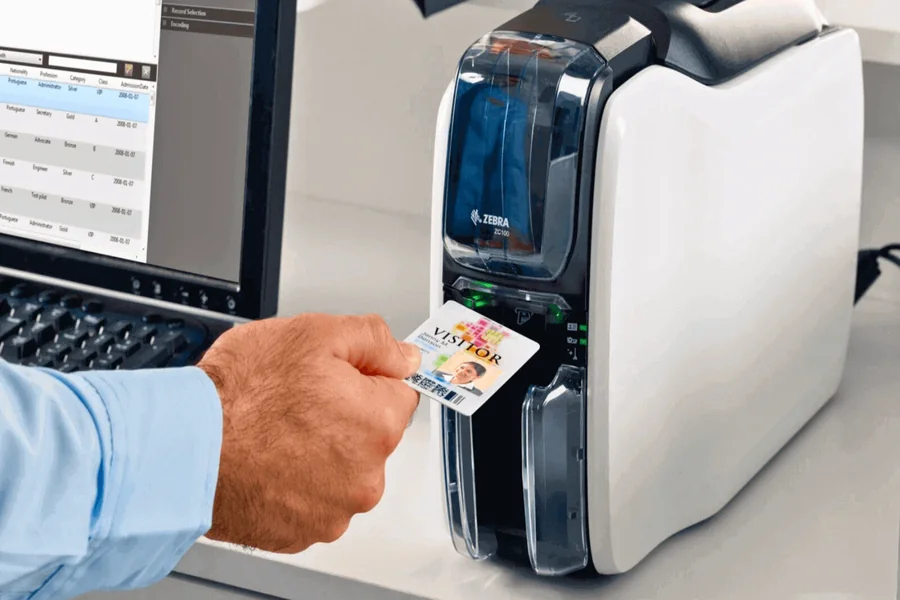
An ID card printer is a specialized printer that produces identification cards on plastic (usually PVC) or composite card stock. Unlike general-purpose printers, ID card printers are engineered to handle durable, high-quality printing of photos, text, barcodes, magnetic strips, RFID chips, security features, and more
Most ID card printers use either direct-to-card (DTC) (dye‑sublimation/resin thermal) or retransfer (reverse transfer) printing methods. The DTC approach prints directly on the surface of the card. The retransfer method prints onto a clear film which is then bonded to the card, often giving better edge-to-edge coverage and more durable results
They may also support lamination, embossing, tactile printing, smart card encoding, magnetic strip encoding, RFID encoding, or overlay security features such as UV or holographic overlays
How Do ID Card Printers Work?
Direct-to-Card (DTC) Printing
In DTC, a colored ribbon passes through the printer. The printer heats tiny color panels on the ribbon (yellow, cyan, magenta, black) and transfers the dye directly to the card surface. This method is fast and cost-effective for moderate volumes
Retransfer Printing
Retransfer (or reverse transfer) prints the image onto a transparent film which is then thermally bonded to the card. Because the image wraps fully to the edges, retransfer printing is excellent for cards that require full-bleed printing, for uneven card surfaces, or for higher durability demands
Post-Processing Features
After printing, additional modules may apply lamination, tactile elements (raised text), or protective overlays. Some printers also encode smart chips, magnetic stripes, or RFID circuits in the same process
Key Features to Consider
When evaluating ID card printers, here are the important features to keep in mind
Print Quality & Resolution
- Standard printers deliver 300 or 600 dpi. Higher resolution (e.g. 600 dpi) gives crisper text and images
- Retransfer models often achieve edge-to-edge printing with excellent color fidelity
Speed & Volume
- Measured in cards per hour (cph). If you need to issue hundreds of cards daily, you’ll want a faster and more robust model
- Some printers support multi-hopper or batch feeding to streamline high-volume jobs
Durability & Security
- Lamination, overlays, and UV coatings protect cards against wear, tampering, and counterfeit attempts
- Tactile printing or embossing adds a layer of physical security
- Tamper-evident overlays or ghost images are additional safeguards
Card Encoding Capabilities
- Magnetic stripe encoding
- Smart card chip (contact/contactless)
- RFID / NFC encoding
- Magnetic stripe + chip + RFID in one pass, depending on the model
Connectivity & Software
- USB, Ethernet, WiFi, or cloud-enabled
- Compatibility with card design and management software
- Remote management and diagnostics
Maintenance & Consumable Costs
- Ribbon cost (single-color, YMCKO, high-capacity variants)
- Laminate film cost
- Parts (print heads, rollers)
- Warranty and service support
- Cleaning kits and preventative maintenance
Use Cases & Applications
ID card printers are used across many industries. Below are a few examples
- Education – Student IDs, library cards, access control
- Corporate & Government – Employee badges, visitor passes, security clearances
- Healthcare – Staff IDs, patient wristbands, access to restricted areas
- Events & Venues – Membership cards, event passes, loyalty cards
- Hospitality & Clubs – Guest/resident identification, membership cards
In each of these settings, the printer must balance speed, security, durability, ease of use, and lifetime cost
How to Choose the Right Printer
Here is a decision framework
- Assess your volume and throughput needs
- Low volume (tens to hundreds of cards monthly) → entry‑level DTC printers
- Medium to high volume (hundreds to thousands) → high-speed DTC or retransfer
- Very high volume or extremely durable cards → industrial models
- Low volume (tens to hundreds of cards monthly) → entry‑level DTC printers
- Decide on security and durability features
- Will cards be exposed to harsh conditions?
- Do you need lamination, overlays, tactile features, chip encoding?
- Will cards be exposed to harsh conditions?
- Check encoding needs
- Magnetic stripe? Smart chip? RFID/NFC?
- Single-pass encoding vs. separate modules?
- Magnetic stripe? Smart chip? RFID/NFC?
- Consider print quality & full-bleed requirements
- If your design requires edge-to-edge printing, retransfer is superior
- For simpler designs, DTC may suffice
- If your design requires edge-to-edge printing, retransfer is superior
- Evaluate connectivity & software integration
- Make sure the printer works with your preferred badge design and ID management systems
- Remote monitoring and cloud support can be useful for distributed operations
- Make sure the printer works with your preferred badge design and ID management systems
- Weigh total cost of ownership
- Compare initial purchase, ribbon & film costs, spares, maintenance, and support
- Confirm warranty terms and local service availability
- Compare initial purchase, ribbon & film costs, spares, maintenance, and support
- Flexibility & modular upgrades
- Some printers let you add modules over time (lamination, embossing, encoding)
- This lets you scale up as your needs evolve
- Some printers let you add modules over time (lamination, embossing, encoding)
Trends and Innovations
- Cloud-based printing and management: Modern printers allow card issuance and management over the cloud, enabling remote or decentralized operations
- Interoperability with access control & IoT systems: ID cards increasingly integrate with smart building systems, biometric terminals, and mobile credentials
- Eco-friendly materials: Biodegradable or recycled PVC, or composite cards, are rising in demand
- Security overlays and holographic features: These help prevent counterfeiting
- Higher durability with composite cards: Especially in harsh use environments, composite materials or enhanced lamination are being used more often
Final Thoughts
ID card printers are more than just “printers for badges.” They’re specialized tools that combine printing, security, and connectivity to support identification, access, and trust in many environments
Whether you’re a school issuing student IDs, a corporation managing employee access, or an event organizer printing membership cards, picking the right printer means matching capacity, durability, security, and cost. Start by assessing your intended usage, required features, and long-term growth. Then choose a solution that gives you flexibility to scale and evolve over time